arduino – MPU6050 新手学习笔记
1.MPU6050是什么?
MPU6050是一个6轴运动处理组件,包含了3轴加速度 和3轴陀螺仪。
2.加速度传感器是干嘛用的?
这个要结合图片来说明,大家可以看这里:
http://download.csdn.net/download/feixiangtiakongn/4545536
总而言这,加速度传感器,其实是力传感器。用来检查上下左右前后哪几个面都受了多少力(包括重力)
3.陀螺仪是干嘛用的?
简而言之,陀螺仪就是角速度检测仪。比如,一块板,以X轴为轴心,在一秒钟的时间转到了90度,那么它在X轴上的角速度就是 90度/秒 (DPS, 角速度单位,Degree Per Second的缩写°/S ,体现了转动的快慢)
4.MPU6050分辨率是多少?
3轴加速度 和3轴陀螺仪分别用了3个16位的ADC, 也就是说,加速度有3个16位ADC,其中每个轴使用了一个。也是说,每个轴输出的数据,是2^16 也就是 -32768 —- +32768。陀螺仪也是一样。
5. 单位换算
上面说的-32768 — +32768 ,那么这个数字到底代表了什么呢?比如陀螺仪 32768 到底是指角速度达到多少度/秒 ?
这个其实是根据MPU6050设置的量程来决定的,量程不一样,32768代表的值就不一样。
MPU6050的量程设置,在 MPU6050::initialize() (MPU6050.cpp库)初始化函数中进行了设置:
setFullScaleGyroRange(MPU6050_GYRO_FS_250);
setFullScaleAccelRange(MPU6050_ACCEL_FS_2);
分别设置为,250度/秒 , 2g
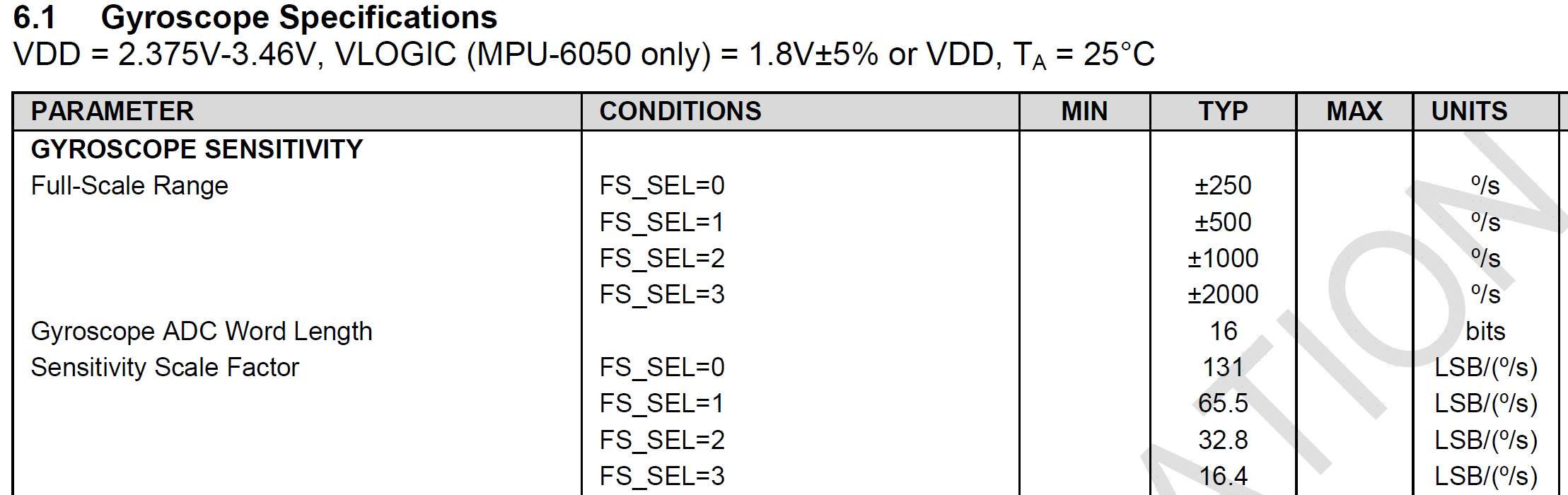
按陀螺仪来说,MPU6050 有四个量程可选:
±250,±500,±1000,±2000 度/s
比方说,设置了是 ±250 , 那么-32768 —- +32768 就代表了 -250 —- +250 。此时它的LSB(拉傻B,最低有效位) 是 131 LSB/(度/s)
MPU 6050 读角度与单位换算
参考数据手册:PS-MPU-6000A
使用带有DMP的最新库函数(https://github.com/jrowberg/i2cdevlib),程序模板采用MPU6050_DMP6例程。
角度:
DMP库函数的dmpGetYawPitchRoll,可以得到pitch(俯仰),yaw(偏航),roll(滚转)角度。
角速度:
void getRotation(int16_t* x, int16_t* y, int16_t* z);
int16_t getRotationX();
int16_t getRotationY();
int16_t getRotationZ();
16位,配置时四个量程可选:±250,±500,±1000,±2000 度/s。
在dmp的例程中初始化:setFullScaleGyroRange(MPU6050_GYRO_FS_2000);
说明是选用最高量程±2000º/s,则换算系数=2^16/4000=16.4 LSB/(度/s)
void getAcceleration(int16_t* x, int16_t* y, int16_t* z);
int16_t getAccelerationX();
int16_t getAccelerationY();
int16_t getAccelerationZ();
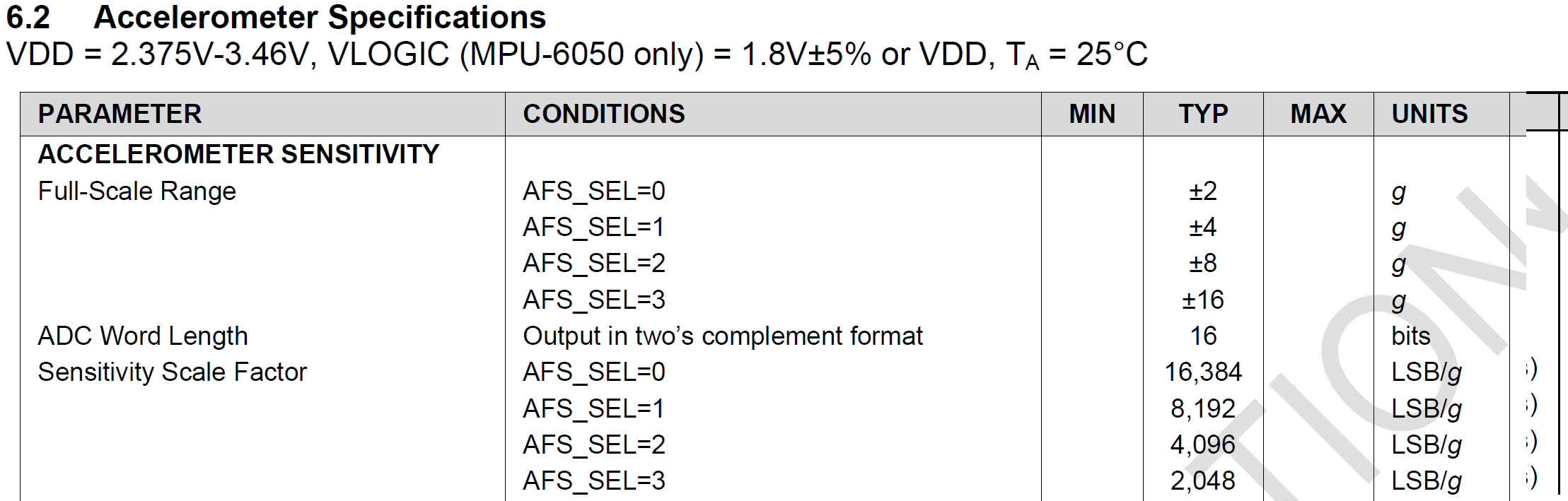
16位,配置时四个量程可选:±2,±4,±8,±16 g。
在dmp的例程中没有找到初始化部分,估计是采用了缺省配置。
通过观察输出值,采用的是最小量程±2g,则换算系数=2^16/4=16384 LSB/g
下面是程序,中断方式,需要把MPU的中断接到arduino数字2脚上。
// Arduino Wire library is required if I2Cdev I2CDEV_ARDUINO_WIRE implementation

// is used in I2Cdev.h

#include "Wire.h"


// I2Cdev and MPU6050 must be installed as libraries, or else the .cpp/.h files

// for both classes must be in the include path of your project

#include "I2Cdev.h"


#include "MPU6050_6Axis_MotionApps20.h"

MPU6050 mpu(0x68);


// MPU control/status vars

bool dmpReady = false;  // set true if DMP init was successful

uint8_t mpuIntStatus;   // holds actual interrupt status byte from MPU

uint8_t devStatus;      // return status after each device operation (0 = success, !0 = error)

uint16_t packetSize;    // expected DMP packet size (default is 42 bytes)

uint16_t fifoCount;     // count of all bytes currently in FIFO

uint8_t fifoBuffer[64]; // FIFO storage buffer


// orientation/motion vars

Quaternion q;           // [w, x, y, z]         quaternion container

VectorFloat gravity;    // [x, y, z]            gravity vector

float ypr[3];           // [yaw, pitch, roll]   yaw/pitch/roll container and gravity vector


// ================================================================

// ===               INTERRUPT DETECTION ROUTINE                ===

// ================================================================


volatile bool mpuInterrupt = false;     // indicates whether MPU interrupt pin has gone high

void dmpDataReady() {

  mpuInterrupt = true;

}


// ================================================================

// ===                      INITIAL SETUP                       ===

// ================================================================


void setup() {

  Serial.begin(115200);        // opens serial port, sets data rate to 9600 bps


  // join I2C bus (I2Cdev library doesn't do this automatically)

  Wire.begin();


  // initialize device

  Serial.println("Initializing I2C devices...");

  mpu.initialize();


  // verify connection

  Serial.println("Testing device connections...");

  Serial.println(mpu.testConnection() ? "MPU6050 connection successful" : "MPU6050 connection failed");


  delay(2);


  // load and configure the DMP

  Serial.println("Initializing DMP...");

  devStatus = mpu.dmpInitialize();


  // make sure it worked (returns 0 if so)

  if (devStatus == 0) {

    // turn on the DMP, now that it's ready

    Serial.println("Enabling DMP...");

    mpu.setDMPEnabled(true);


    // enable Arduino interrupt detection

    Serial.println("Enabling interrupt detection (Arduino external interrupt 0)...");

    attachInterrupt(0, dmpDataReady, RISING);

    mpuIntStatus = mpu.getIntStatus();


    // set our DMP Ready flag so the main loop() function knows it's okay to use it

    Serial.println("DMP ready! Waiting for first interrupt...");

    dmpReady = true;


    // get expected DMP packet size for later comparison

    packetSize = mpu.dmpGetFIFOPacketSize();

  }

  else {

    // ERROR!

    // 1 = initial memory load failed

    // 2 = DMP configuration updates failed

    // (if it's going to break, usually the code will be 1)

    Serial.print("DMP Initialization failed (code ");

    Serial.print(devStatus);

    Serial.println(")");

  }

}


void loop()

{

  float alpha,omiga;


  // if programming failed, don't try to do anything

  if (!dmpReady)

    return;


  // wait for MPU interrupt or extra packet(s) available

  if (!mpuInterrupt && fifoCount < packetSize)

    return;


  // reset interrupt flag and get INT_STATUS byte

  mpuInterrupt = false;

  mpuIntStatus = mpu.getIntStatus();


  // get current FIFO count

  fifoCount = mpu.getFIFOCount();


  // check for overflow (this should never happen unless our code is too inefficient)

  if ((mpuIntStatus & 0x10) || fifoCount == 1024) {

    // reset so we can continue cleanly

    mpu.resetFIFO();

    Serial.println("FIFO overflow!");


    // otherwise, check for DMP data ready interrupt (this should happen frequently)

  }

  else if (mpuIntStatus & 0x02) {

    // wait for correct available data length, should be a VERY short wait

    while (fifoCount < packetSize) fifoCount = mpu.getFIFOCount();


    // read a packet from FIFO

    mpu.getFIFOBytes(fifoBuffer, packetSize);


    // track FIFO count here in case there is > 1 packet available

    // (this lets us immediately read more without waiting for an interrupt)

    fifoCount -= packetSize;


    mpu.dmpGetQuaternion(&q, fifoBuffer);

    mpu.dmpGetGravity(&gravity, &q);

    mpu.dmpGetYawPitchRoll(ypr, &q, &gravity);  //从DMP中取出Yaw、Pitch、Roll三个轴的角度,放入数组ypr。单位:弧度

    alpha=-ypr[2] * 180/M_PI;


    omiga=mpu.getRotationX()/16.4;        //配置是16位表示正负2000°/s, 65536/4000


    Serial.print("Alpha ");

    Serial.print(alpha);

    Serial.print("\tOmiga ");

    Serial.println(omiga);


  }

}
1. 下载arduino编译器,目前版本为1.0.5。
2. 下载MPU6050库。进入“https://github.com/jrowberg/i2cdevlib”,点击“zip”即可。
3. 安装。将上一步下载的“I2Cdev”、“MPU6050”两个文件夹拷贝到“arduino-1.0.5\libraries”目录下。
运行arduino可以在例子中看到MPU6050。OK!
博主知道怎样调节mpu6050的采样频率吗
谢谢分享!!!
这个传感器获取数据容易,处理数据就难了啊!加油!
说的是啊。数据得到了,进行数据删选,过滤,分析,进行计算,这一系列的事情才是最头疼的。
对呢。在用Arduino进行数据获取时,有很方便的库和IIC借口进行获取,就是波特率的选择,以及数据获取到之后的处理,让我真心觉得不好弄。
还有,在进行数据获取时,波特率用9600在做运动检测时够用吗?请赐教!
我也没有具体测试,如果以后测试有心得了会告诉你。
好的,期待!